
TypingMaster 12.01.972
TypingMaster is a Windows-only typing tutor that's been teaching touch typing since 1996. The free version offers a 1-week course with lessons, games, and basic tests, while the Premium license ($29.90 lifetime) unlocks the Satellite feature, a background tool that tracks your real-world typing, identifies weak keys, and creates personalized drills. Version 12 adds dark mode, bigram analytics, new games (Cloud Race, Pipe Master), and improved support for non-QWERTY layouts. It's a solid choice for structured learners who want detailed feedback, though the free trial is short and there's no Mac or mobile version. For free alternatives, TypingClub and Keybr are worth checking out.
- Free
- Windows
- Oct 8, 2026
Screenshots
About TypingMaster
Ever feel like your fingers just can't keep up with your thoughts when you're typing? You're not alone. That's where TypingMaster comes in, a full-featured program built to seriously level up your typing game, whether you're hunting for speed, accuracy, or just more confidence at the keyboard.
So what exactly is TypingMaster? In a nutshell, it's like having a personal typing coach right on your computer. It offers structured lessons, real-time tests, and even fun typing games to help you build muscle memory and improve your skills over time. Unlike some other typing apps out there, TypingMaster focuses heavily on performance tracking and personalized feedback, so you know exactly where you're shining and where you need a little more work. The latest version, TypingMaster 12 (build 12.01.972), is a 12 MB installer that runs on Windows 11, 10, 8, and 7. It's been around since 1996, so it's not some fly-by-night operation, these people have been teaching typing for almost three decades.
Free vs. Premium: What's the Actual Difference?
Good news: TypingMaster comes in both free and paid versions. The free version gives you a 1-week touch typing course with basic lessons, practice tests, and a handful of games, enough to get a feel for whether it clicks with you. But honestly? That free period is pretty short. After seven days, some features get restricted, and if you want to upload your own custom text for practice, you're out of luck without the premium version.
If you want to dig deeper, the Premium License costs $29.90 for a lifetime version, while the Standard License is $19.90. That's a one-time payment, not a subscription, which is honestly refreshing in 2026. The premium version unlocks the Satellite feature, which is the real selling point here, it monitors your typing even outside the app, tracking your real-world performance and creating personalized review exercises based on the keys and words you struggle with most. That means you get feedback on your actual daily typing, not just in practice mode.
Why Choose TypingMaster Over Other Typing Tutors?
For starters, it's packed with specialized modules that guide you through touch typing in a way that's both effective and engaging. You'll go through drills, games, and tests that are designed to stick. And one of its coolest features? It works smoothly with online typing platforms, so you can import your typing profiles and pick up right where you left off.
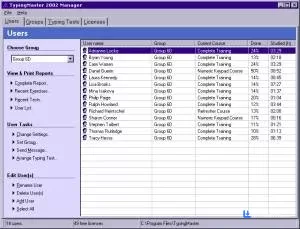
One standout tool is the TypingMeter widget, a little on-screen overlay that acts like a live performance dashboard. It shows your words per minute, error rate, and even which keys you stumble on most. The updated version in TypingMaster 12 adds bigram analytics and heatmaps, which is a fancy way of saying it shows you exactly which letter combinations are slowing you down. Yeah, it might feel a bit in-your-face at first, but it's incredibly useful for spotting weak spots instantly. Plus, you can minimize it anytime.
What's New in TypingMaster 12?
The jump from version 11 to 12 was actually pretty significant. You get improved game support for non-QWERTY layouts like Dvorak and Colemak, which is great if you're not using a standard keyboard. There are two new games, Cloud Race and Pipe Master, that are genuinely fun and don't feel like homework. Dark mode is finally here, which is nice for late-night practice sessions. And the typing tests are now highly customizable with flexible time limits, pass conditions, custom text, and Unicode support. Version 12.01 also improved Hindi typing accuracy, so if you're learning a non-Latin script, that's a solid bonus.
TypingMaster also uses color-coded visuals and on-screen guides to help you learn proper finger placement and reduce typos. Every time you complete an exercise, you get a detailed breakdown of what went wrong and how to fix it. It's like having instant replay for your typing mistakes.
How Does It Stack Up Against Alternatives?
Now, here's where things get interesting. TypingMaster is great, but it's not the only game in town, and depending on what you want, you might prefer something else.
TypingClub is probably the most popular free web-based alternative. It's browser-based, so it works on any platform, and it has a gamified curriculum with progress tracking. Schools love it because you can create custom lessons. But it lacks the Satellite feature and the deep performance analytics that TypingMaster offers, so if you want detailed feedback on your real-world typing, TypingMaster wins.
Keybr is another solid option. It's free, open-source, and uses adaptive drilling to generate words targeting your weak keys. It's minimalist and effective, but it's web-based and doesn't have the structured course progression or games that TypingMaster offers.
Monkeytype is the go-to for speed measurement. It's clean, distraction-free, and completely free. But it's not a tutor, it won't teach you touch typing from scratch. It's more for people who already know how to type and just want to measure and improve their speed.
Tipp10 is a free, open-source Windows alternative that's genuinely good. It's lightweight, supports multiple languages, and has a clean interface. But it hasn't been updated as frequently as TypingMaster, and it lacks the Satellite-style real-world tracking.
Now, is it worth downloading? Absolutely, especially if you're on Windows. The interface might look a little old-school, but don't let that fool you. Under the hood, it's a powerful, well-structured typing course that adapts to your progress. There's no mobile version, but let's be real, nothing beats a physical keyboard when you're trying to build real typing skill.
All in all, TypingMaster is a straightforward, no-nonsense tool that delivers what it promises: better typing, fewer errors, and more confidence. Whether you're a student, office worker, or just someone who wants to type faster without looking down, this program can help you get there. The free 1-week trial is a bit short, and the $29.90 lifetime license isn't free, but considering the Satellite feature and the 30 years of development behind it, it's a reasonable investment. And hey, with a free version available, you've got nothing to lose by giving it a try.
Versions
| Version | Release date | Platform | File size | |
|---|---|---|---|---|
| TypingMaster 12.01.972 Latest version | Apr 8, 2026 | Windows | 12.0 MB | Download |