

Kindle 2.0
Kindle for PC was a beloved free app that let you read Amazon eBooks on your Windows computer with syncing, customization, and annotation features. But in June 2026, Amazon discontinued the old app and replaced it with a new Windows 11-only Kindle app that has been widely criticized for lost library access, removed features, and tighter DRM, it currently sits at a 1.7-star rating on the Microsoft Store. The new app makes it harder to access or convert your purchased books, pushing users toward alternatives like Calibre (for library management) or Kindle for Web (for browser-based reading). If you're on Windows 10, you're left without an official Kindle desktop app entirely.
- Free
- Windows
- Oct 8, 2026
Screenshots
About Kindle
If you're an avid reader who prefers the comfort of a computer screen, Kindle for PC used to be a game-changer. It let you dive into Amazon's massive collection of eBooks without needing a physical Kindle device. Whether you were studying textbooks, browsing research materials, or just enjoying a novel, having your entire digital library on a bigger screen made everything easier to read and absorb.
But here's the thing, the Kindle for PC you remember doesn't exist anymore. Amazon officially killed it on June 30, 2026. That old app, which was sitting at version 1.17.1 for what felt like forever, is gone. In its place, there's a brand-new Kindle for Windows app available exclusively through the Microsoft Store, and it only runs on Windows 11 (version 21H2 or later). If you're still on Windows 10, you're basically out of luck. The new app is version 1.0.16118 (as of June 2026), and it's a completely different beast.
What's the New App Like?
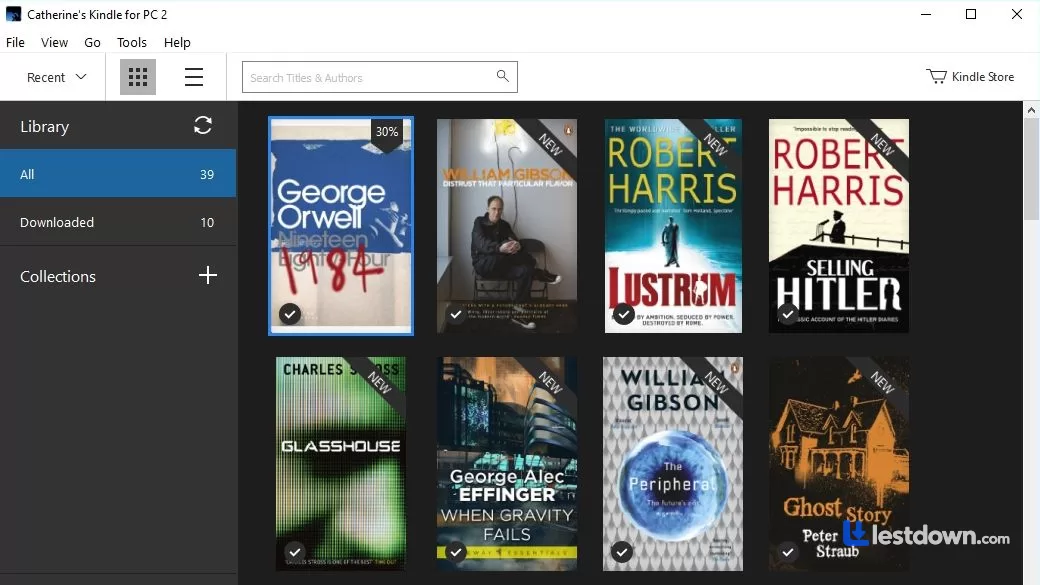
Once you log into your Amazon account, the new Kindle app syncs up instantly. Your purchased books, free titles, and even book samples become accessible right away. Your reading progress, bookmarks, and notes stay in sync across all your devices, so whether you switch from your PC to your phone or a Kindle e-reader, you'll always pick up right where you left off. That part still works. Customization is also there: you can tweak text size, change the font, adjust background colors, switch to dark mode, and even set up multi-column layouts. There's a built-in dictionary and a search tool, and you can highlight passages and add notes, which is genuinely useful for students and researchers.
But Here's the Problem, And It's a Big One
When the new app launched in June 2026, it got absolutely review-bombed. As of mid-June 2026, its Microsoft Store rating had plummeted to 1.7 stars, and that's out of 5. People are furious. The main complaints? The app is slow to launch (no improvement over the old one), and several customization features that used to exist have been removed. But the real killer is this: the save folder location changed, which means anyone who had downloaded books in the old app can't access them anymore. They're just... gone from the new app's perspective. On top of that, some books are now marked as "unsupported" and can't be downloaded at all. For a reading app, that's pretty much the worst possible outcome.
The DRM Situation Got Worse
Here's something that's going to annoy a lot of people: the new Kindle for Windows app is much more locked down. The old Kindle for PC stored books in a way that tools like Calibre (with the DeDRM plugin) could sometimes work with, you could convert your purchased Kindle books to EPUB or other formats for personal use. The new app uses different storage formats and tighter DRM, making it nearly impossible to access your own purchased files for backup or format-shifting. Amazon basically closed the door on that workflow. If you're someone who liked the idea of actually owning the books you paid for, this is a frustrating development.
How Does It Compare to Calibre?
This is where things get interesting. Calibre is still the gold standard for managing eBook libraries. It's free, open-source, supports virtually every format imaginable, and lets you convert, edit metadata, and organize your entire collection regardless of where you bought your books. The current version is around 9.14 (as of late 2026), and it's been consistently updated for over a decade. But here's the catch: Calibre alone can't handle Kindle DRM. You need the DeDRM plugin and, for newer Kindle formats, the KFX Input plugin as well. And with the new Kindle app's tighter restrictions, that workflow has gotten significantly harder. Calibre is still the best tool for managing a large, heterogeneous library, especially if you've got books from Kobo, Nook, or anywhere else. But if your entire library is locked into Amazon's ecosystem, you're increasingly at their mercy.
Other Alternatives Worth Mentioning
If the new Kindle app isn't working for you, there are a few other options. Kindle for Web lets you read your Kindle books in a browser without installing anything, but it lacks offline reading and some advanced features. Adobe Digital Editions is good for EPUB and PDF books, especially library loans, but it's not great for Kindle content. Sumatra PDF is a lightweight, open-source reader for Windows that handles PDF, EPUB, MOBI, and more, it's fast and clean, but it's a reader, not a library manager. And if you're willing to explore beyond Amazon entirely, Kobo's desktop app and Google Play Books both have web readers that work on Windows.
All in all, Kindle for PC used to be a fantastic, simple way to read your Amazon library on a bigger screen. But the 2026 transition has been rough. The new Windows 11-only app is missing features, has lost access to previously downloaded books, and locks down your purchased content more aggressively than ever. If you're on Windows 11 and just want to read your Kindle books, it works, barely. If you're on Windows 10, or you care about owning and converting your eBooks, you're better off looking elsewhere. Calibre remains the best tool for library management, but even it can't fully solve the Kindle DRM problem anymore. It's a sad state of affairs for anyone who just wanted a clean, functional reading experience on their PC.
Versions
| Version | Release date | Platform | File size | |
|---|---|---|---|---|
| Kindle 2.0 Latest version | Jun 2, 2026 | Windows | 763.5 MB | Download |