
Startup Sound Changer 1.0
Startup Sound Changer is a free, portable Winaero utility that lets you replace the Windows startup sound with any WAV file, play the current sound, or restore the default. It requires administrator privileges, only supports WAV format, and applies changes per user account. Originally built for Windows Vista and 7, it still works on later versions but has been succeeded by Winaero Tweaker, an all-in-one customization tool with 200+ tweaks that's actively updated and supports Windows 7–11. On Windows 11, where the startup sound is removed by default, Winaero Tweaker is the safer, more reliable choice. Alternatives include the AutoHotkey-based StartupSound script and the open-source SoundManager.
- Free
- Windows
- Oct 9, 2026
Screenshots
About Startup Sound Changer
Want to change that familiar Windows startup sound? Startup Sound Changer from Winaero lets you swap it out for any sound you want, something Windows doesn't normally allow. It's perfect if you're tired of hearing the same old tune every time you boot up your PC. And honestly? It's one of those tiny tools that solves a problem you didn't realize was solvable until you found it.
Think about it, you can customize nearly everything in Windows these days: wallpapers, themes, even mouse cursors. But the startup sound? That's always been locked down. Microsoft removed the startup chime entirely in Windows 8, and while Windows 10 technically has one, it's disabled by default. Windows 11? It's gone. Just silence. Until now. This free tool gives you control over one of the last untouched parts of Windows personalization.
How It Works
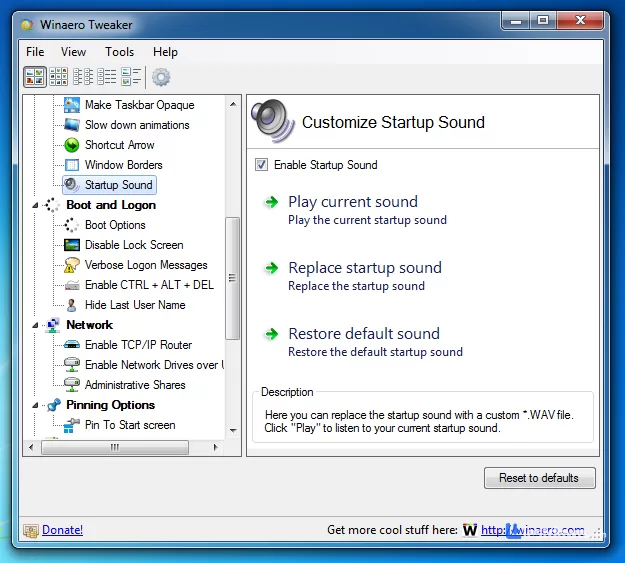
The program couldn't be simpler to use. Just download and run it, no installation needed. It's a portable executable, about 180 KB, and you can drag it to your desktop and double-click whenever you need it. You get three main options:
Play Current Sound: Hear what your startup currently sounds like
Replace Startup Sound: Pick any WAV file to use instead
Restore Default Sound: Go back to the original Windows chime
That's it. No settings to configure, no registry to mess with manually, no system files to patch. It handles the elevated privileges part for you, you'll get a UAC prompt when you launch it, which is normal.
Windows 10 Users Take Note
Fun fact, Windows 10 actually has a startup sound, but Microsoft hides it by default. If you want to hear it (before changing it), just search for "Sound" in your Start menu, open "Change System Sounds," and check the "Play Windows Startup sound" box. On Windows 11, that checkbox doesn't exist anymore, which is exactly why Startup Sound Changer (or its successor) exists.
Things to Know
While this tool is great for quick customization, there are a few limitations you should be aware of:
It only works with WAV files. You'll need to convert MP3s or other formats first. Audacity or an online converter will do the trick, just make sure it's a standard PCM WAV file, not a compressed one.
The changes only apply to the current user account. If you have multiple accounts on your PC, you'll need to run it under each one.
It requires administrator privileges. Not a big deal, but worth knowing.
There's no shortcut or Start menu entry. You run the downloaded executable each time you want to make adjustments. It's portable, which is great, but it's not a "set and forget" app in your system tray.
It was designed for Windows Vista and 7. The developer hasn't updated it in years, and it's now considered a legacy tool.
The Successor You Should Actually Use
Here's the thing, Startup Sound Changer still works, but it's been replaced by Winaero Tweaker, an all-in-one customization app that includes the startup sound feature plus over 200 other Windows tweaks. If you just want to change your boot sound, you can still grab the standalone tool. But if you're the kind of person who likes tinkering with your system, Winaero Tweaker is the better investment. It's actively updated, supports Windows 7 through 11, and is free for personal use. The startup sound option lives under Appearance > Startup Sound, and you can enable it, replace it, or restore the default from there.
Winaero Tweaker 1.65 was released in February 2026, so it's still actively maintained. The startup sound checkbox now reflects the actual status in recent Windows versions, which was a bug in older builds.
A Quick Note on Windows 11
On Windows 11, the startup sound situation is a bit different. Microsoft removed the chime entirely, and enabling it requires either Winaero Tweaker or a registry edit. The registry path is HKEY_CURRENT_USER\AppEvents\EventLabels\WindowsLogon, but honestly? Just use Winaero Tweaker. It's safer and it actually works. There are also open-source alternatives like the AutoHotkey-based StartupSound script on GitHub, which uses Task Scheduler to play a custom WAV file on login. It's lightweight and free, but it requires AutoHotkey and a bit more setup. SoundManager is another option, it's free, open-source, supports Windows XP through 11, and can patch the built-in startup sound with admin rights.
A Word of Caution
One user on Softonic reported that Startup Sound Changer "completely ruined" their D: drive, causing 100% drive activity and preventing their computer from booting until they unplugged their SSD. That's a single report and not necessarily typical, but it's a reminder that messing with system sounds can occasionally go wrong. Winaero Tweaker is generally considered safer because it's more actively maintained and tested on modern Windows versions.
Bottom line, if you've ever wanted to make your PC's startup sound your own, this is the easiest way to do it. Just download, pick your sound, and enjoy the change next time you boot up. Is it perfect? No. The standalone tool is dated, Windows-only, and WAV-only. But it's free, portable, and it does one thing well. If you want the modern version, grab Winaero Tweaker. Either way, you'll never have to hear that same old chime again.
Versions
| Version | Release date | Platform | File size | |
|---|---|---|---|---|
| Startup Sound Changer 1.0 Latest version | Mar 31, 2026 | Windows | 2.3 MB | Download |