

Fences 6.54
Fences is Stardock's premium desktop organization tool for Windows 10 and 11, letting you group icons into customizable, labeled containers called "Fences." The latest version 6 adds tab support, icon tinting, revamped Folder Portals, ARM processor support, and better DPI scaling for high-resolution monitors. The signature feature, double-clicking to hide all icons, remains patented and delightful. Pricing starts at $29.99 for a perpetual license, with yearly and multi-device options available. It's the most polished desktop organizer available, but persistent bugs like broken auto-icon-spacing and occasional license reactivation issues are well-documented. Free alternatives include Portals, DesktopBox, and DeskBox.
- Free trial
- Windows
- Oct 9, 2026
Screenshots
About Fences
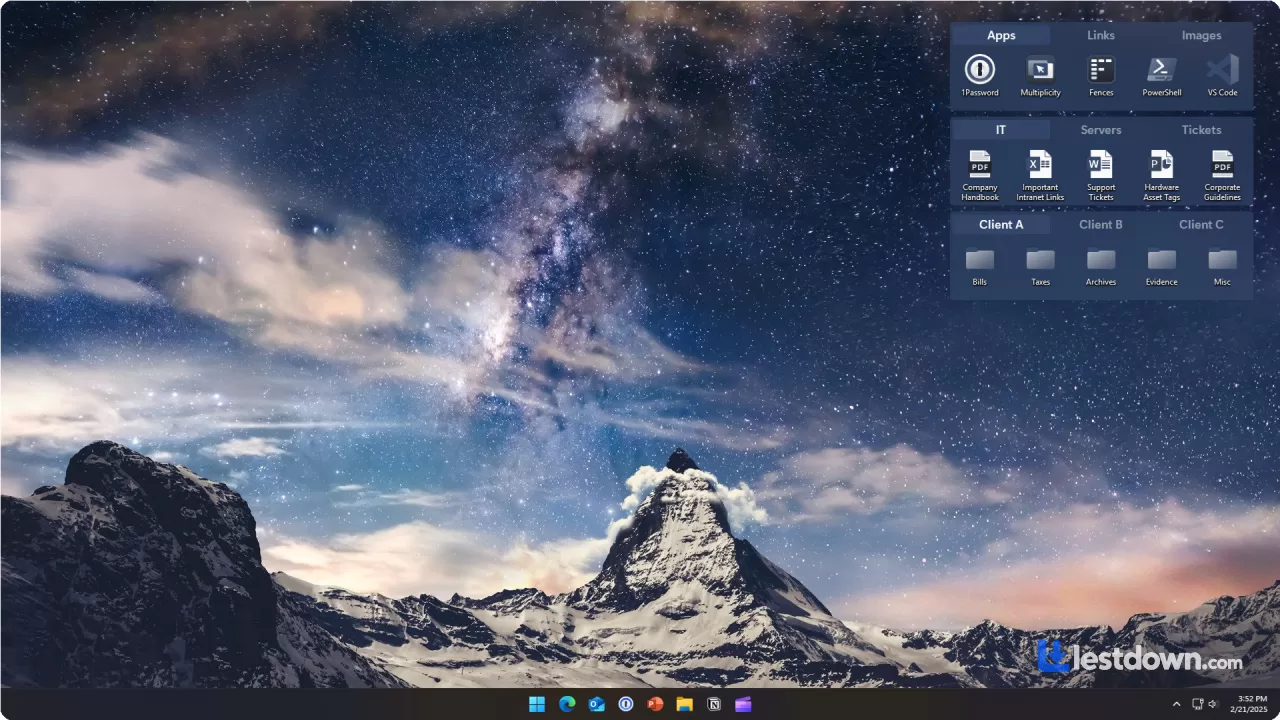
Ever feel like your desktop is a chaotic mess of icons? Fences is here to rescue you. This clever program helps you organize your desktop by grouping icons into neat, customizable sections called, you guessed it, "Fences." Think of it as giving your desktop a tidy makeover without replacing your familiar setup.
With Fences, you can rope off shaded areas on your screen where you can drop and organize icons however you like. Want a section for work files and another for personal stuff? No problem. You can label, move, and resize these Fences freely. If you're just getting started, pre-made layouts make the setup super quick and easy.
But here's the real game-changer: ever wanted to actually see your beautiful wallpaper without all those icons in the way? Just double-click on any empty spot on your desktop, and watch as all your icons magically fade away. Another double-click brings them right back. It's so smooth and handy that the creators even patented the feature. Plus, you can choose to keep specific icons or Fences visible while hiding the rest.
What's New in Fences 6 (2026)
The latest major release, Fences 6, came out in May 2025, and it's a genuinely significant upgrade over Fences 5. The headline feature is tab support, you can now stack multiple Fences as tabs within a single group, which is an absolute game-changer if you have a lot of icons and limited screen space. There's also icon tinting with a color picker, so you can color-code your Fences for instant visual recognition. Folder Portals got a revamp with drag-and-drop directly onto tab headers, and the whole thing now supports ARM processors, so if you're on a Snapdragon X Elite laptop, you're covered.
Other quality-of-life improvements include smoother drag-and-drop operations, better DPI scaling for 4K and 5K monitors, and the ability to exclude icons outside Fence groups from quick-hide. There's also a new "require click to open Rollup Fence groups" option, which prevents accidental expansion when you're just trying to move things around.
Pricing: It's Not Free Anymore (And Hasn't Been for a While)
Heads up, though: while earlier versions were free, Fences became a paid program starting with version 2.00. And the pricing has gotten a bit... complicated. The current **perpetual license costs $29.99**, a one-time payment with no ongoing subscription required, which includes feature updates within Fences 6 and compatibility updates for Windows. There's also a yearly option at around $10/year, and a Multi-Device Upgrade for $10.99 if you want to use it on more than one PC. Steam frequently runs discounts, the current price there is $25.49 (15% off), so if you're patient, you can save a few bucks.
Is it worth it? That depends entirely on how much you value an organized desktop. XDA-Developers called it useful but noted "the cost is too high for a desktop manager". MakeUseOf was more forgiving, saying "$10 a year can feel like a total bargain or a bit much depending on how much you value an organized desktop". I lean toward the latter, if you spend eight hours a day staring at a cluttered desktop, $30 once is a no-brainer. If you just occasionally tidy up, maybe not.
System Requirements
Fences 6 requires Windows 10 or 11 (64-bit), a 1 GHz Intel or AMD x86 processor (ARM is now supported), 51 MB of RAM, a 1 GB video card, and about 50 MB of disk space. It's lightweight enough to run on basically anything modern. Administrator privileges are required for the initial install, which is standard for this kind of system-level utility.
The Rough Edges (Because Nothing's Perfect)
Here's where I have to be straight with you. Fences has some persistent bugs that have been annoying users for years. The most commonly reported issue is auto-icon-spacing being broken, one forum user literally gave up their subscription because "auto-icon-spacing on the desktop is still messed up... something that Fences 3 used to do in a perfect way". That's a five-year-old bug that still isn't fixed. That's... not great.
There are also reports of license reactivation issues, where the software demands a license key every 2-3 days, which sounds incredibly annoying. Multi-monitor setups with different resolutions can cause icons to spread out and Fences to resize incorrectly, and some users on Windows 11 25H2 have reported freezing and File Explorer right-click issues. One user even reported a Windows 11 conflict that required a refund. These aren't universal problems, plenty of people use Fences without issue, but they're worth knowing before you buy.
Alternatives Worth Considering
If the price or the bugs put you off, there are free alternatives. Portals is an open-source desktop organizer for Windows with extensive customization options and a clean interface, it's probably the closest free equivalent to Fences. DesktopBox is another free, portable option that sorts files into tabbed boxes without moving them, has no telemetry, and is a single 71 MB executable. DeskBox offers native WinUI 3 widgets and real-folder-backed containers, making it feel like a modern open-source take on Fences. None of them have Fences' automated rules engine or Folder Portals, but they get the job done for basic organization.
Fences is still the best desktop organizer on Windows. The tab system in version 6 is genuinely transformative, the icon tinting is a nice touch, and the core experience of double-clicking to hide everything never gets old. But it's not cheap for what it is, and the persistent bugs are frustrating for a tool that's been around this long. If you're a heavy desktop user who wants automation and polish, Fences is worth the money. If you just want to group some icons and don't care about rules or portals, grab a free alternative and save your cash. Either way, your desktop doesn't have to be a mess anymore.
Versions
| Version | Release date | Platform | File size | |
|---|---|---|---|---|
| Fences 6.54 Latest version | Aug 18, 2026 | Windows | Download |