
Free Chess 2.1.1
Free Chess is a lightweight, completely free chess program for Windows that focuses on simplicity and clean gameplay. It offers smart move checking, ten adjustable difficulty levels, online play support, and runs on everything from Windows XP to Windows 11 with a tiny 8.8 MB installer. There are no ads, no account requirements, and no time limits, just straightforward chess at your own pace. It's perfect for casual players and beginners who want a no-fuss way to enjoy the game without the complexity of training-focused alternatives like Lucas Chess or the clunky interfaces of older programs like Arena.
- Free
- Windows
- Oct 8, 2026
Screenshots
About Free Chess
If you're interested in learning or simply enjoying chess, Free Chess makes it easy. It's a lightweight program that brings the classic board game to your computer without any extras or complications. Whether you're a beginner or just want a simple way to play, this software has everything you need to get started. And honestly? Sometimes that's exactly what you want, no bloat, no account sign-ups, no nonsense.
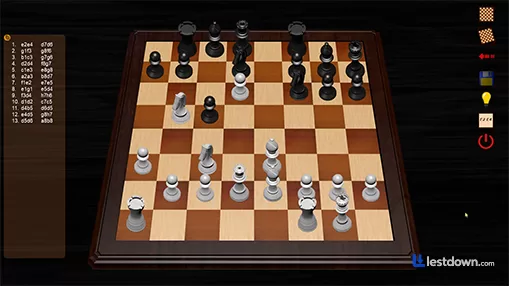
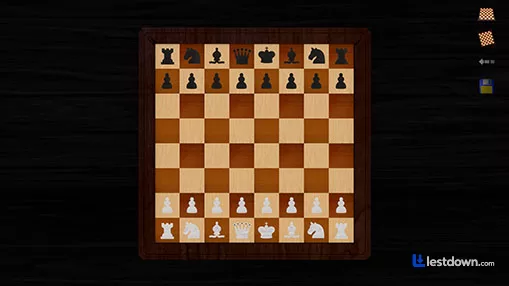
Everything about Free Chess is kept simple. The game has a clean layout, clear pieces, and smooth performance. You won't find flashy graphics or distracting animations, just a quiet space to focus on your moves. It's a good pick for anyone who prefers a basic and clear chess experience. The whole installer is only about 8.8 MB, which is tiny by today's standards. It runs on everything from Windows XP all the way up to Windows 11, so unless you're on a Chromebook, you're probably fine. There's even online play support if you want to test your skills against real people instead of just the computer.
What You Get with Free Chess
Smart Move Checking: The game shows you if a move is allowed or not, so you can avoid mistakes. It's a small thing, but it saves you from those "wait, that's illegal?" moments.
Adjustable Difficulty: You can change how strong the computer is, making it easier or harder depending on your level. There are ten levels of difficulty, which is actually pretty generous for a free program. Beginners can start on the lower settings without getting crushed, and more experienced players can crank it up.
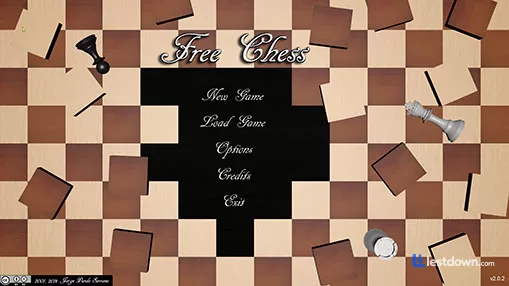
Easy Setup: No confusing menus. Just open the game and start playing in seconds. No account required, no internet connection needed. Double-click the .exe and you're in.
A Smooth Playing Experience
Free Chess runs well on most Windows PCs. It starts quickly and doesn't use much memory. There's no need to go through a long setup or sign in with an account. Just download it, open it, and you're ready to play. The interface is about as straightforward as it gets, you see the board, you see the pieces, you move them. That's it.
Simple Yet Enjoyable
One of the nice things about this game is how calm it feels. There are no ads, no time limits, and no pressure. It's just chess, at your own pace. You can also change some settings to match your style of play, like flipping the board or turning hints on and off. If you're the kind of person who likes to sit and think through a position without a clock ticking in your ear, this is a nice change of pace.
How It Compares to Other Free Chess Programs
Now, here's where things get interesting. Free Chess is great for casual play, but it's not the only free chess program out there, and depending on what you want, you might prefer something else.
Lucas Chess is probably the most popular free alternative, and for good reason. It's built as a training tool first and a game second. It comes with about 20 different engines built in, each with varying strength levels, so you don't have to download anything extra. It's got tons of training modes, tactics puzzles, and even a mode that gives you limited hints to help you improve. The interface is modern and clean, unlike some older chess programs that feel like they were designed in 1998. The main downside? The latest version (R 2.1.1) requires Windows 10 or 11 64-bit, so if you're on an older machine, you're out of luck.
Arena Chess GUI is another option, but honestly? I'd skip it unless you're into engine tournaments. It's powerful for analysis and running engine-vs-engine matches, but the interface is clunky and ugly. One forum user literally called it "terrible to use, ugly, clunky, doesn't do anything that other software doesn't do better." That's harsh, but it's not wrong. It hasn't been updated since 2015, which says a lot.
SparkChess is more of a "fun-first" chess game. It's available on multiple platforms including Windows, and it has a friendly interface with 2D and 3D boards. The free version is ad-supported, but the ads are unobtrusive. It's a good middle ground if you want something prettier than Free Chess but don't need all the training features of Lucas Chess.
WinBoard is another classic option. It's been around forever, supports all skill levels, and has a simple graphical interface. It's free and open-source, but the interface feels dated. If you don't mind the look, it's a solid choice.
The Verdict
If you're looking for a no-stress way to practice chess or pass the time, Free Chess is a great option. It won't teach you fancy strategies, it won't analyze your games, and it won't help you improve your opening repertoire. But it will give you a clean and easy place to enjoy the game. And the best part, it's totally free. No ads, no subscriptions, no hidden charges.
That said, if you're serious about improving, Lucas Chess is worth checking out. It's basically a chess coach disguised as a game. And if you want something prettier, SparkChess has you covered. But for pure simplicity? Free Chess is hard to beat. Sometimes you just want to play chess, not configure twenty different engine settings. And that's exactly what Free Chess delivers.
Versions
| Version | Release date | Platform | File size | |
|---|---|---|---|---|
| Free Chess 2.1.1 Latest version | Dec 23, 2024 | Windows | 8.8 MB | Download |